Repository visibility, alongside your existing Git tools.
Discover, explore and compare the Git repositories on your Mac. Find duplicate codebases, inspect branches and commits, and bring your development workspace into one clear dashboard.
Apple Silicon · macOS 13+ · Your repositories stay local.
GitPlane / your MacLOCAL
SCATTERED FOLDERS. A CONNECTED VIEW.
DevelopmentYour everyday projects
Agent worktreesParallel checkouts
ArchivesThe checkouts you forgot
One clear viewYOUR LOCAL INDEX
Read-only discoveryStored locally
Local-first, alwaysRead-only by designWorks with your existing GitNo accounts. No uploads.
THE CURRENT APP / v0.1.2
Your workspace, in view.
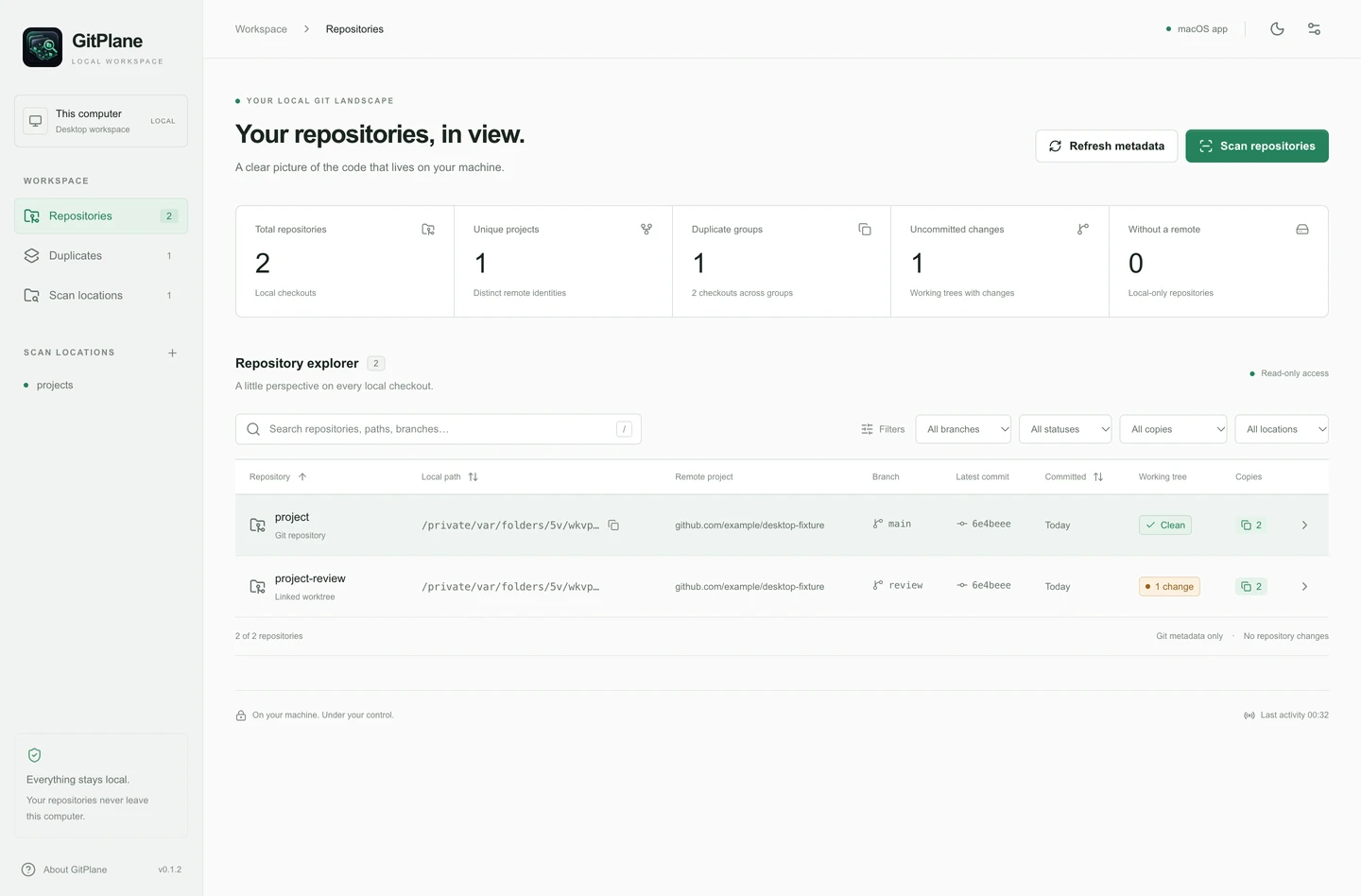
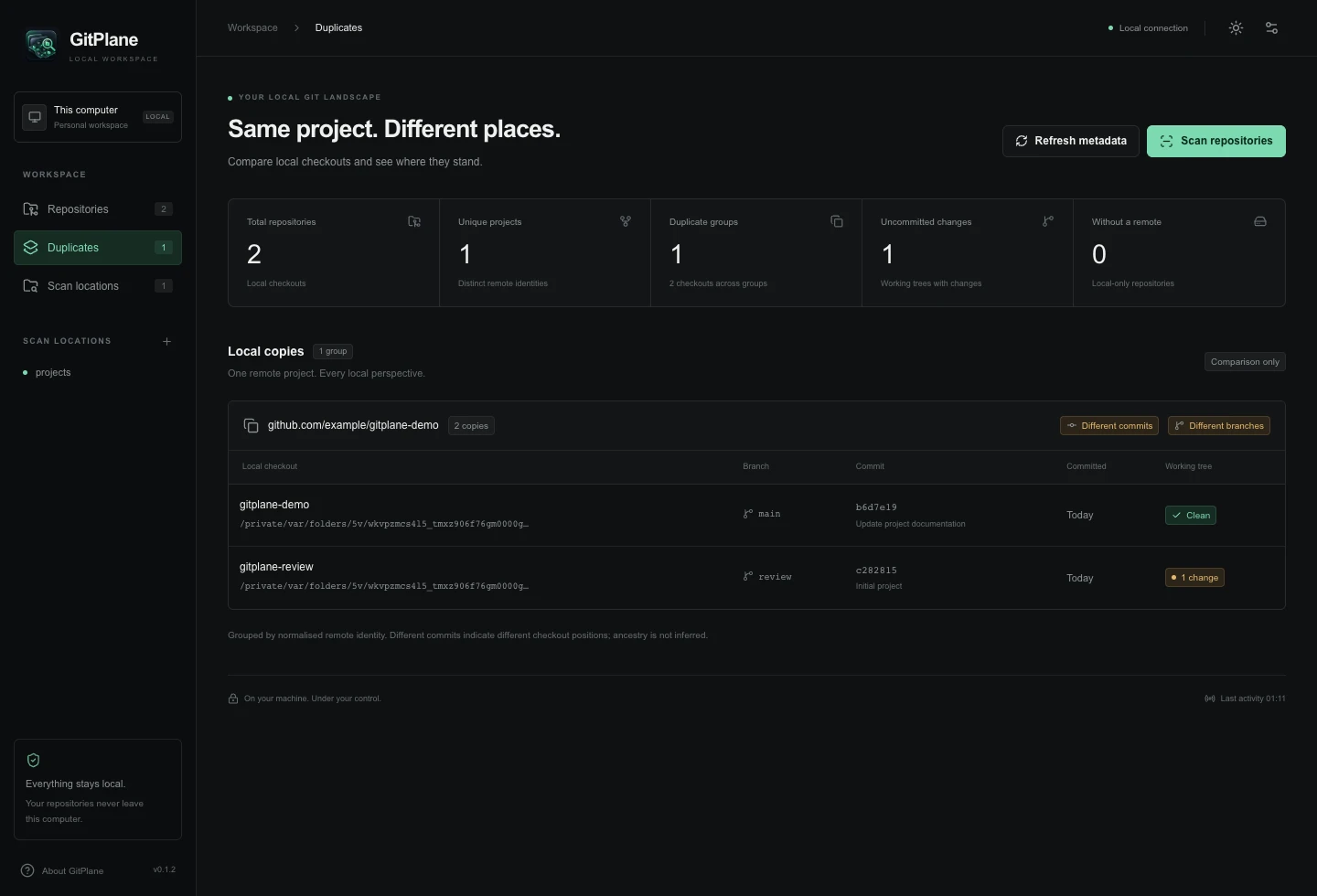
Explore the dashboard, then compare copies of the same project. Both are included in GitPlane.
See your entire workspacePaths, remotes, branches, latest commits and working-tree changes.Compare local copiesIdentify matching remote projects and see where their checkouts differ.
Actual application views using temporary local test repositories. Select an image to inspect it at full size.
01 / THE BIGGER PICTURE
Less searching through folders. More knowing where things stand.
The projects you cloned. The branches you left behind. The worktrees your agents created. See where they stand, without changing a single checkout.
Discover every repository.
Choose your development and worktree folders and discover the repositories inside. Discover standard and nested repositories, submodules, linked worktrees and repositories without remotes. Overlapping scan roots do not duplicate a checkout.
Your development folder
Git repositories
Linked worktrees
Nested projects
Recursive scans · Incremental results · Cancel any time
Find duplicate codebases.
Spot local copies that share a remote. Compare their paths, branches, commits and working trees. Different branches and commits are highlighted. Current comparison checks equality, without ancestry, ahead/behind counts or divergence analysis.
DIFFERENT URLS. ONE REMOTE IDENTITY.git@github.com:example/project.githttps://github.com/example/project.git
github.com/example/projectMatched
Understand your Git state.
See clean or modified state and staged, modified, untracked and conflicted counts. Inspect detached HEAD, empty repositories and last-known unavailable states.
See your entire workspace.
Search names, paths and remotes. Narrow the view by branch, working-tree status, duplicates or location. Sort by name, path or commit date and open repository details.
Private by design.
Repository counts, unique remote projects, duplicate groups and unfinished work are visible at a glance. Your local SQLite index and unavailable metadata survive restarts.
At home on your Mac.
Choose folders with the macOS picker, use native app menus and open a checkout in Finder. Launch from Applications and get straight to work.
Scan on your terms.
Scan several locations or a single folder. Watch incremental progress, cancel a job, review errors and scan history, or refresh known checkouts without a full rescan.
Keep the details close.
Inspect remotes, commit dates and working-tree changes. Copy a path or remote URL, open the remote in your browser and compare the other local copies.
FOR PARALLEL WORK. HUMAN AND AGENT.
One project. Several checkouts. One place to look.
Codex, Claude Code or another coding environment creates a Git worktree. Another task starts in a fresh clone. Your own changes are somewhere else. GitPlane brings those checkouts into view alongside your everyday projects.
Find the worktrees behind the work.
Include your agents’ working directories in a scan. See linked worktrees and separate clones with their full local paths.
See where each checkout stands.
Compare branches and latest commits. Spot staged, modified and untracked files that have not made it into a commit.
Keep your workflow in your hands.
Review local copies that share a remote, then open the folder you need. GitPlane leaves every checkout as it is.
Standard Git checkouts within your chosen scan locations. GitPlane does not identify agents, monitor sessions, read conversations or coordinate their work.
02 / CLOSE TO YOUR CODE
Your machine. Your repositories. Your business.
A useful view of your code shouldn’t require sending it somewhere else. GitPlane runs its scanner on your Mac and reads the Git metadata already on your computer. Your repository index stays on your device, even when you close the app.
On your MacRight here. Where it belongs.
Observe. Understand. Leave it as it is.
No pull, push, branch switching or automatic cleanup. Your repositories stay under your control.
Private without the setup.
No sign-in, hosting-provider authentication or external APIs. Repository contents and metadata stay local.
You choose the boundaries.
Scan only the locations you select. Permission errors are recorded, symlinks are skipped and wider device scans need your approval.
03 / FIND YOUR BEARINGS
From scattered to sorted. In three small steps.
01
Choose your project folders.
Open the Mac app and select one or more locations with the native folder picker. Nothing is scanned automatically.
02
Let the landscape unfold.
Run a recursive scan. Repositories appear as they’re discovered, with progress and errors along the way.
03
Get the whole picture.
Inspect a checkout, compare local copies, copy a path or jump straight into its folder in Finder.
Your workspace, ready when you are.Node.js and SQLite included. Just bring your Mac and an installed copy of Git.
GitPlane for Mac brings the explorer, scanner and local database into one desktop app. No server to start. No browser tab to keep open.
Apple SiliconmacOS 13 or later
Signed & notarisedDeveloper ID distribution
Your existing GitGit 2.31+ required
v0.1.2 is signed, notarised and stapled for direct distribution.
Package and launch checks pass. Clean-machine installation, native folder selection, protected-folder permissions and normal upgrades still need final manual validation.
Node.js and SQLite are bundled. Windows, Linux, Intel Mac and Mac App Store releases are not currently available as verified products. Notarisation is not App Store approval.
GITPLANE PRO / COMING SOON
Go deeper with GitPlane Pro.
GitPlane Pro will build on the standard app with advanced divergence analysis, continuous monitoring, configurable alerts and detailed reporting.
£39One-time purchase Coming Soon
All capabilities below are planned. They are not implemented in v0.1.2. No release date has been announced.
Advanced repository intelligence
Deeper codebase comparisons, more detailed branch and commit relationships, and signals for potentially risky or neglected checkouts.
Drift and divergence detection
Commit ancestry, divergent histories and ahead/behind comparisons where the available Git history permits.
Continuous monitoring
Filesystem watching, background repository-state updates and change detection without manual rescanning.
Alerts and notifications
Configurable monitoring rules and notifications for significant repository changes, divergence and relevant status updates.
Reports and exports
Inventory exports, repository health summaries, duplicate and divergence reports, and shareable or downloadable reports.
ONE TIME PRICING
A clear view. A one-time purchase.
GitPlane includes the complete current discovery and comparison workspace. Pro will add deeper analysis and monitoring.
THE INITIAL MAC PRODUCT
GitPlane
£19
One-time purchase
Discover, inspect and compare your local Git repositories.
Multi-location recursive repository discovery
Nested repositories, submodules and linked worktrees
Repository dashboard, full paths and Git remotes
Branches, latest commits and working-tree state
Duplicate identification and local checkout comparison
Search, filters and sorting
Scan progress, cancellation and job history
Full scans and lightweight metadata refresh
Copy paths and remotes; open Finder or remote links
Local SQLite storage and retained unavailable metadata
The Mac installer is prepared. Final release validation, payment and delivery testing, and commercial configuration still need completion.
THE PRODUCT ROADMAP
Starting on your Mac. Looking ahead.
The current product and the direction that follows. Status labels describe readiness, not release dates.
01
GitPlane for macOS
Initial launch
v0.1.2 is built, signed and notarised. Final release validation and commercial distribution still need completion.
02
GitPlane Pro
Coming Soon
Advanced intelligence, drift analysis, continuous monitoring, alerts and reporting. Planned features; no release date announced.
03
GitPlane Chrome Extension
Planned
Connect a repository page to your local inventory, find existing copies and open a checkout. Requires a secure bridge to the installed GitPlane app; no extension exists yet.
04
GitPlane Cloud
Planned
Optional cross-device inventory, synchronised repository metadata, discovery history and remote viewing of indexed workspaces. Scanning stays local; synchronisation would require an explicit choice to share metadata.
05
GitPlane Teams
Future
Potential shared inventories, team-wide visibility, developer environment insights and engineering reports. A future product direction, not a committed release.
Other platforms remain separate plans. GitPlane stays local-first; Cloud and Teams do not describe current functionality.
A FEW THINGS TO KNOW
Good questions. Straight answers.
What is GitPlane?+
GitPlane is a local-first application for discovering, inspecting and comparing Git repositories across your development environment. Keep your existing editor and Git client; use GitPlane to find the right checkout and understand its current state.
What does GitPlane cost?+
GitPlane is priced at £19 as a one-time purchase. The standard edition includes duplicate comparison, linked worktrees, search, scan progress and history. Purchase and download access are not enabled yet.
Is GitPlane a subscription?+
No. GitPlane is £19 and the upcoming GitPlane Pro is £39, each as a one-time purchase. Pro is Coming Soon and cannot be purchased yet.
Can GitPlane find duplicate repositories?+
Yes. It groups local checkouts that reference the same normalised remote project, including supported SSH and HTTPS variants. Compare paths, branches, latest commits and working-tree state. Current comparison checks equality; it does not calculate commit ancestry, ahead/behind counts or divergence.
Does GitPlane support Git worktrees?+
Yes. Linked worktrees are discovered within your selected scan locations and treated as separate physical checkouts. Nested repositories and submodules are also discovered, and repositories without remotes remain visible.
Does GitPlane work with AI coding agents?+
Yes, when tools such as Codex or Claude Code create standard Git clones or linked worktrees within your configured scan locations. GitPlane shows their Git state. It does not identify the creating agent, monitor running agents, read conversations, track token usage or coordinate agent work.
Does GitPlane modify my repositories?+
No. The current application focuses on read-only discovery and inspection. It does not fetch, pull, push, switch branches, create commits, merge copies or delete repositories. Duplicate comparison is informational.
Does GitPlane upload my code?+
No. The current desktop and local browser workspace inspect Git locally and store repository information in local SQLite. The scanner does not upload repository contents or metadata. Git itself may inspect working-tree files to determine their status. Cloud synchronisation appears only on the future roadmap.
Do I need a GitHub, GitLab or Bitbucket account?+
No hosting-provider login, external cloud database or API key is required. GitPlane uses the Git executable on your computer and can discover repositories with no remote configured.
What can it scan?+
Choose multiple locations and scan their subdirectories for repositories, nested projects, submodules and worktrees. Overlapping roots do not duplicate the same physical checkout. Symlinks and common build/cache folders are skipped; inaccessible directories are recorded without ending the entire scan. Device-root scanning requires explicit approval and remains subject to OS permissions.
Where does my data live?+
Your repository index, scan locations and scan history stay in a local SQLite file and persist across restarts. The desktop app and locally served browser workspace use separate databases by default.
Which operating systems are supported?+
The initial direct-distribution build targets Apple Silicon Macs running macOS 13 or later, with Git 2.31 or later installed. Node.js and SQLite are bundled with the Mac app. Windows, Linux, Intel Mac and Mac App Store releases are not currently available as verified products. Apple notarisation is not Mac App Store approval.
Can I use GitPlane in my browser?+
Yes, through a local Node.js server running on the same computer as your repositories. This developer setup requires Node.js 24 or later, npm and Git 2.31 or later. The hosted marketing website cannot directly scan your Mac or execute its installed Git. The packaged desktop app needs no separate Node.js installation.
What is GitPlane Pro?+
GitPlane Pro is an upcoming £39 one-time purchase edition. Planned capabilities include deeper repository intelligence, drift and divergence analysis, continuous monitoring, configurable alerts, and reports and exports. The standard £19 product already includes local duplicate comparison and scan history.
When will GitPlane Pro launch?+
GitPlane Pro is Coming Soon. No release date has been announced. Its features are planned and are not part of the current v0.1.2 application.
Can I purchase or download GitPlane now?+
The v0.1.2 Mac installer is signed, notarised and stapled and has passed documented package and launch checks. Final clean-machine installation, native folder selection, protected-folder permissions and normal upgrade validation remain. Purchasing and customer delivery are not enabled yet.
A HOME FOR YOUR LOCAL GIT LANDSCAPE
Know where your code lives.
Your projects. Your agents’ worktrees. Your unfinished work. Give every checkout a little context.
Launching Soon — £19 £19 one-time purchase at launch. Local discovery. No hosting-provider sign-in.